
What Is a WordPress Booking Plugin?
WordPress booking plugins allow businesses to accept appointments, reservations, and scheduled services directly from their website. They are used by consultants, salons, clinics, fitness studios, event organizers, and many other service-based businesses.
A WordPress booking plugin is a software solution that allows customers to schedule appointments, reserve services, book resources, or request time slots directly from a WordPress website.
Why Businesses Use WordPress Booking Plugins
Businesses use WordPress booking plugins in many different ways. A consultant may use one to schedule online meetings. A salon may use one to manage stylists and appointments. A clinic may rely on one to coordinate practitioners, treatment rooms, and patient schedules.
Although the booking experience often looks simple on the surface, the systems operating behind the scenes can be surprisingly complex.
A modern booking plugin may need to:
- Manage services and durations
- Calculate availability
- Coordinate staff schedules
- Process payments
- Send notifications
- Synchronize calendars
- Track customers and booking history
This is why not all WordPress booking plugins are built the same way. Some focus on simple scheduling, while others are designed to support much more advanced business operations.
Before looking at different types of booking solutions, it’s important to understand what actually happens inside a booking system.
Why a Booking Plugin Is More Than a Calendar
Many people assume that a booking plugin is simply a calendar with available time slots.
In reality, the calendar is often only the visible layer.
Imagine a customer booking a physiotherapy appointment for next Tuesday at 10:00 AM.
From the customer’s perspective, the process may appear straightforward:
- Select a service.
- Choose a date.
- Pick a time.
- Confirm the booking.
Behind the scenes, however, the booking system may be performing dozens of checks before allowing that appointment to be confirmed.
For example, the system may verify:
- Whether the practitioner is
- working that day
- Whether another appointment already exists
- Whether enough preparation time is available
- Whether the selected service can be performed by that practitioner
- Whether the treatment room is available
- Whether a deposit is required
- Whether the customer already owns a package
Only after all these conditions are satisfied can the booking be confirmed.
This is why modern WordPress booking plugins function more like operational systems than simple calendars.
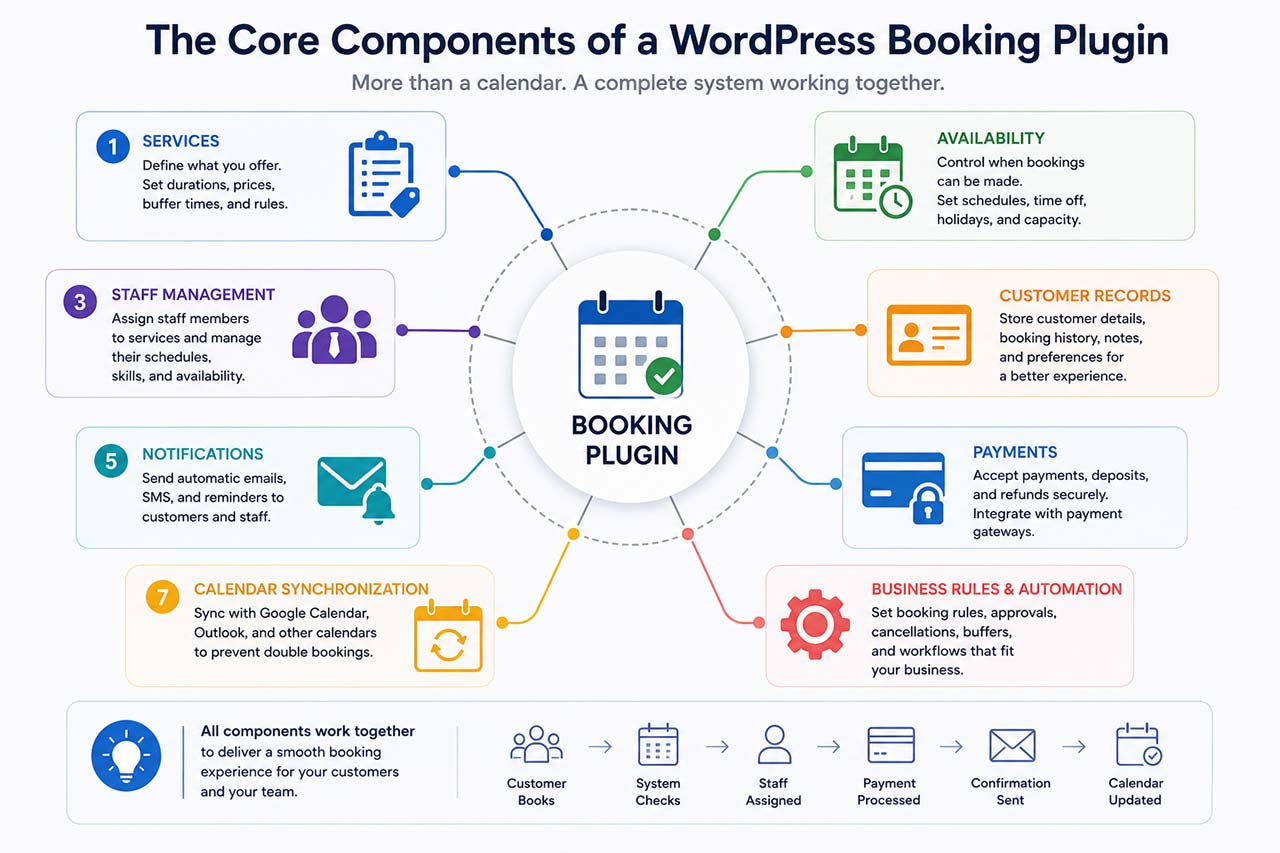
The Core Components Found in Most Booking Systems
Although WordPress booking plugins vary widely in features and complexity, most of them rely on the same core building blocks.
Understanding these components makes it easier to understand how booking systems work and why certain plugins are better suited to specific business models.
Services
Every booking begins with a service.
Examples include:
- Consultation
- Haircut
- Massage
- Fitness session
- Driving lesson
- Medical appointment
To a customer, a service may simply appear as a selectable option.
To the booking system, however, a service contains important information such as:
- Duration
- Price
- Assigned staff members
- Available locations
- Capacity limits
- Booking rules
A service is often the starting point for every availability calculation.
Availability
Availability determines when a booking can occur.
The system may evaluate:
- Working hours
- Holidays
- Days off
- Break periods
- Buffers between appointments
- Notice periods
- Maximum booking windows
For example, a personal trainer may work from 9:00 AM to 6:00 PM but require a 15-minute break between clients.
The booking plugin must account for those rules before displaying available time slots.
Staff Management
Many businesses rely on multiple employees.
The booking system must know:
- Who performs which services
- When each employee works
- Which appointments already exist
- Which locations each employee serves
A physiotherapy clinic, for example, may have practitioners specializing in different treatments. The booking plugin should only display staff members who can perform the selected service.
Customer Records
Every booking generates data.
Most booking systems maintain customer information such as:
- Name
- Phone number
- Appointment history
- Notes
- Payment records
More advanced systems may also track:
- Packages
- Memberships
- Credits
- Invoices
- Service preferences
As businesses grow, customer records often become one of the most valuable parts of the system.
Notifications
Once a booking is created, communication becomes important.
Most WordPress booking plugins can automatically send:
- Confirmation emails
- Appointment reminders
- Cancellation notices
- Rescheduling notifications
These automations help reduce missed appointments while improving the customer experience.
Payments
Some booking systems only schedule appointments.
Others also process payments.
Depending on the business, the booking plugin may support:
- Full payments
- Deposits
- Partial payments
- Refunds
- Taxes
For many service businesses, payments are closely connected to the booking process.
Calendar Synchronization
Many professionals already manage their schedules through external calendar applications.
As a result, booking systems often integrate with:
- Google Calendar
- Microsoft Outlook
- Apple Calendar
- iCal-compatible calendars
Synchronization helps prevent conflicts and keeps availability accurate across multiple systems.
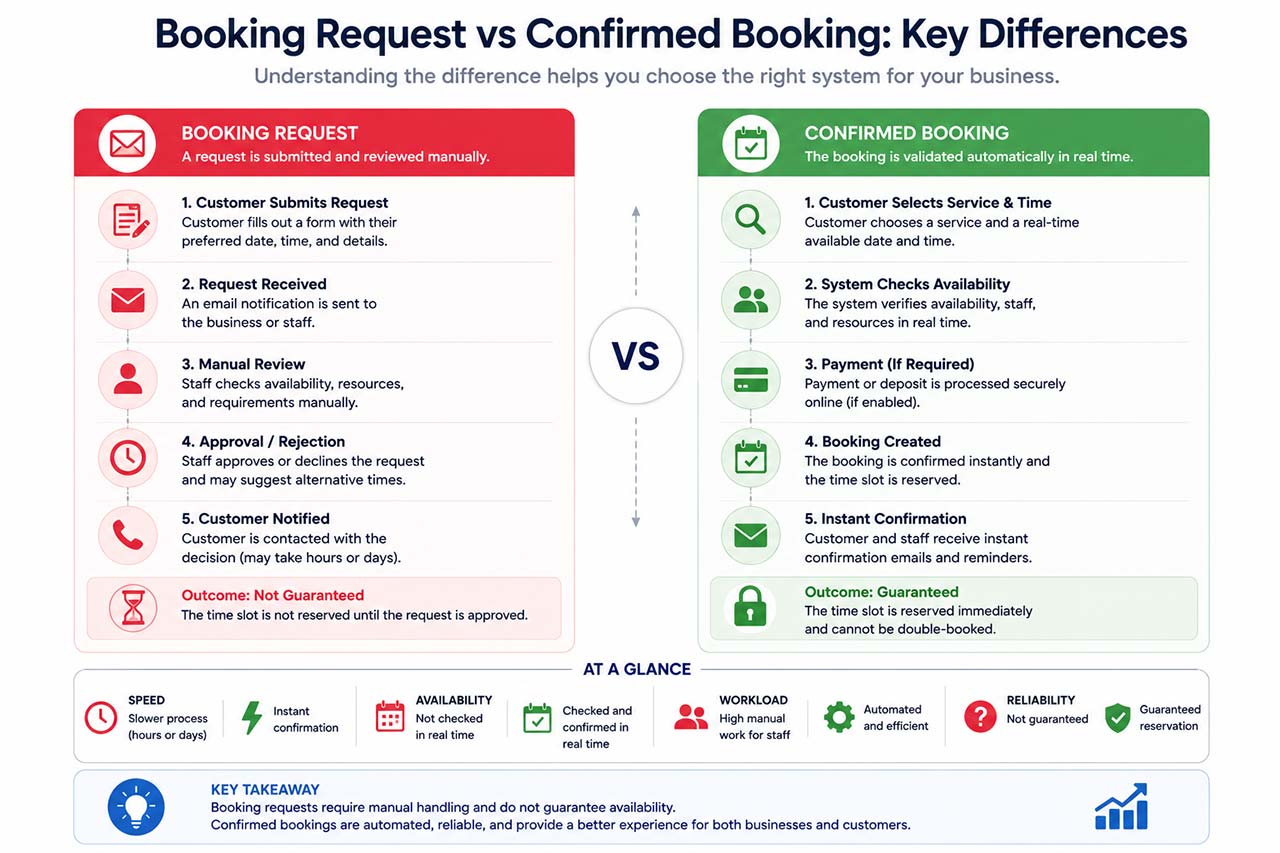
The Difference Between a Booking Request and a Confirmed Booking
One of the most misunderstood aspects of online booking is the difference between a booking request and a confirmed booking.
At first glance, they may appear identical.
However, they operate very differently.
A Booking Request
A booking request simply collects information.
The customer may submit:
- Preferred date
- Preferred time
- Service requested
- Contact information
The business then reviews the request and decides whether to approve it.
Nothing is automatically reserved.
A Confirmed Booking
A confirmed booking is different.
The system evaluates availability and immediately reserves the selected time slot.
The customer receives instant confirmation because the booking engine has already verified that all conditions are satisfied.
This distinction is important because many businesses initially believe they need a booking plugin when they actually only need a request form.
Others discover the opposite: what seemed like a simple form eventually becomes difficult to manage manually.
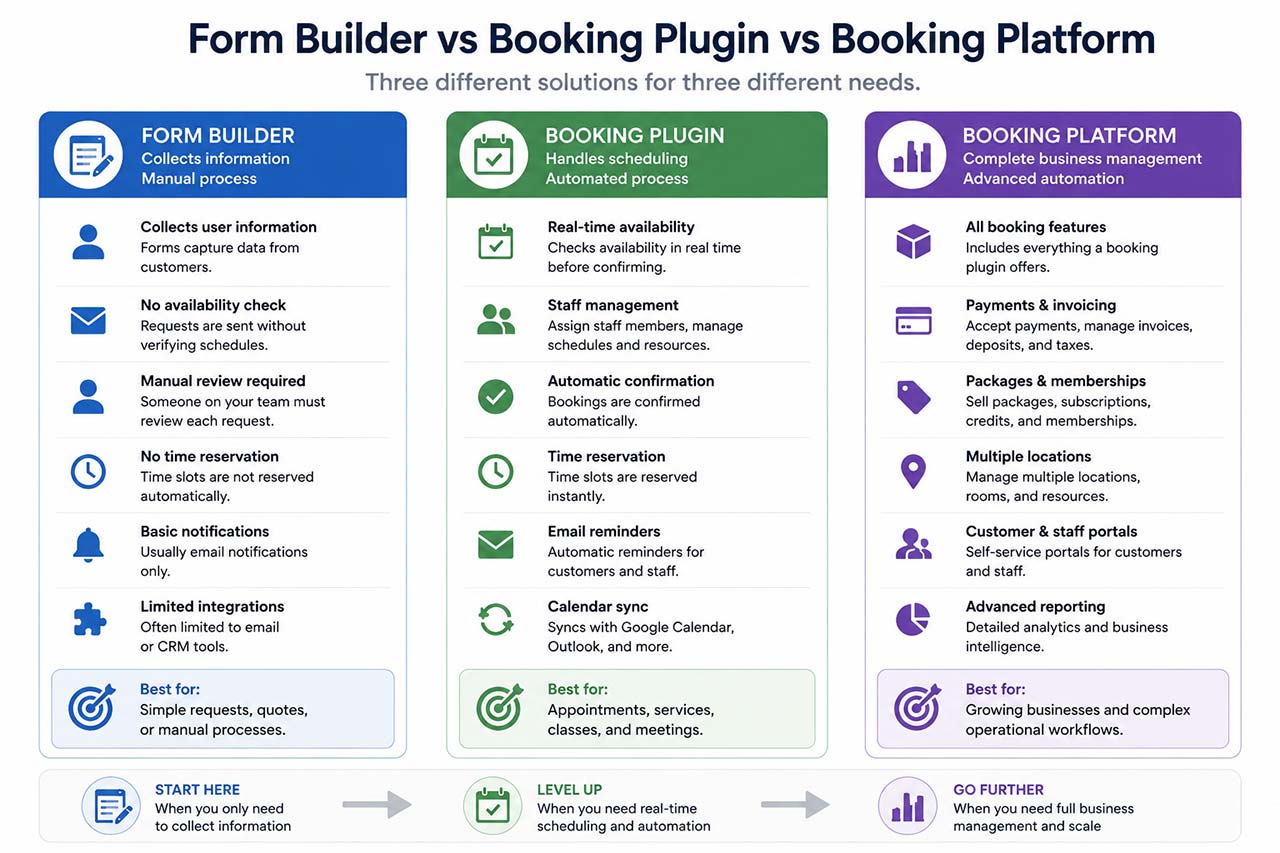
Are Form Builders Also WordPress Booking Plugins?
Popular tools such as Gravity Forms, Fluent Forms, WPForms, Formidable Forms, and JetFormBuilder are often used to create reservation forms, but they do not always provide the scheduling logic found in dedicated WordPress booking plugins.
But are they truly booking plugins?
The answer is both yes and no.
What Form Builders Do Well
A form builder is designed to collect information.
For example, a restaurant may create a reservation form asking:
- Name
- Date
- Number of guests
- Special requests
When the form is submitted, the restaurant receives the information and manually decides whether the reservation can be accepted.
For many small businesses, this approach works perfectly well.
What Booking Plugins Do Differently
A booking plugin goes further.
Instead of collecting a request, it makes scheduling decisions automatically.
The system may:
- Check availability
- Verify staff schedules
- Prevent double bookings
- Reserve resources
- Block unavailable time slots
- Process payments
- Send confirmations instantly
Using the restaurant example, a booking plugin could automatically determine whether a table is available and immediately confirm the reservation without human intervention.
When a Form Builder Is Enough
A form builder may be sufficient when:
- Reservations are reviewed manually
- Scheduling rules are simple
- Availability does not change frequently
- Immediate confirmation is not required
When a Booking Plugin Becomes Necessary
A dedicated booking plugin usually becomes necessary when a business needs:
- Real-time availability
- Staff scheduling
- Automated confirmations
- Payments and deposits
- Calendar synchronization
- Capacity management
As booking volume increases, the difference between collecting requests and managing reservations becomes increasingly important.
Understanding this distinction is often the first step toward choosing the right solution for a growing business.
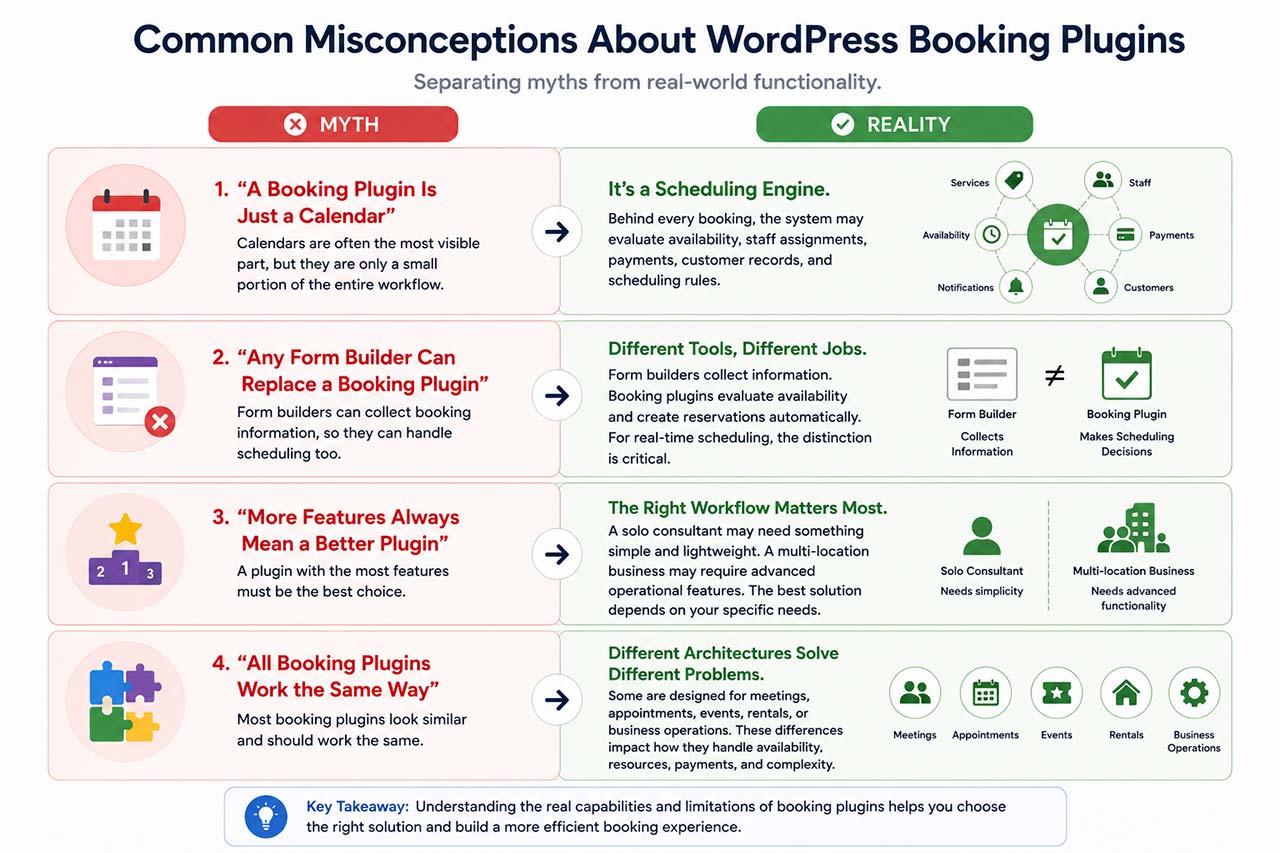
Common Misconceptions About WordPress Booking Plugins
A Booking Plugin Is Just a Calendar
This is one of the most common misconceptions.
While calendars are often the most visible part of a booking system, they represent only a small portion of the overall workflow.
Behind every booking, the system may evaluate availability, staff assignments, payments, customer records, and scheduling rules.
Any Form Builder Can Replace a Booking Plugin
Form builders and booking plugins solve different problems.
A form builder collects information.
A WordPress booking plugin evaluates availability, applies scheduling rules, and creates reservations automatically.
For businesses with real-time scheduling requirements, the distinction becomes important.
More Features Always Mean a Better Booking Plugin
Not necessarily.
A solo consultant may benefit from a lightweight scheduling solution.
A multi-location business may require advanced operational functionality.
The best solution depends on the workflow being managed, not simply the number of features available.
Understanding how to choose a booking plugin based on workflow requirements is often more valuable than comparing feature lists alone.
All Booking Plugins Work the Same Way
Although many WordPress booking plugins appear similar on the surface, their underlying architecture can differ significantly.
Some are designed for:
- Meetings
- Appointments
- Events
- Rentals
- Business operations
These differences influence how they handle availability, resources, payments, and scheduling complexity.
How WordPress Booking Plugins Work Step by Step
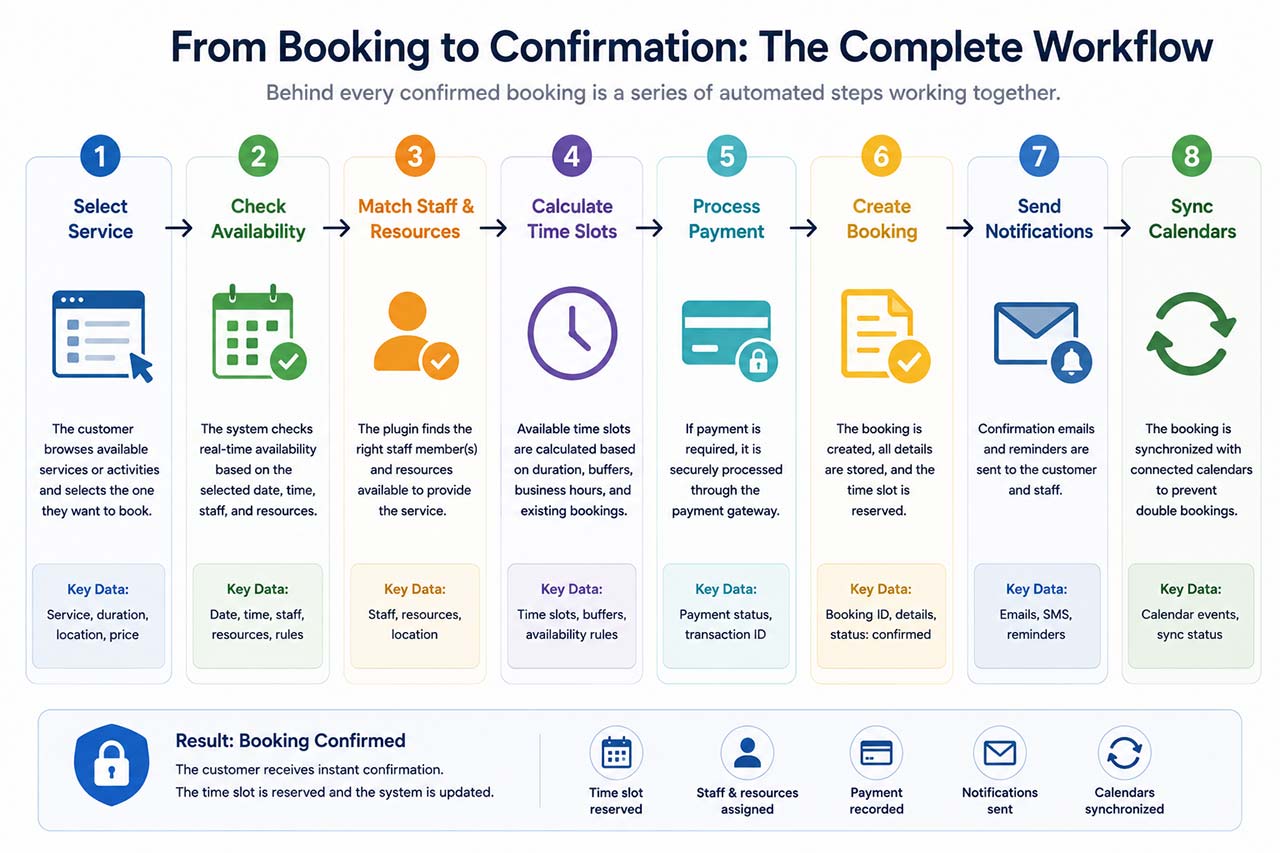
Understanding the components of WordPress booking plugins is useful, but the easiest way to understand how these systems work is to follow a booking from start to finish.
Let’s look at what happens when a customer books an appointment online.Most WordPress booking plugins follow a similar workflow, even though their internal architecture and feature sets may differ.
Most WordPress booking plugins follow a similar workflow, even though their internal architecture and feature sets may differ.
Step 1: Selecting a Service
Every booking begins with a service.
For example, a physiotherapy clinic may offer:
- Initial Assessment
- Sports Rehabilitation
- Post-Surgery Recovery
- Massage Therapy
The customer’s first decision is usually selecting the service they need.
This choice is important because it influences everything that follows.
The booking system may use the selected service to determine:
- Duration
- Price
- Available practitioners
- Available locations
- Booking rules
For example, a 30-minute consultation and a 90-minute treatment session require completely different scheduling calculations.
Without a clearly defined service structure, accurate scheduling becomes difficult.
Step 2: Checking Availability
Once a service has been selected, the booking system begins checking availability.
This is one of the reasons why a WordPress appointment booking plugin is much more complex than a simple contact form.
The booking plugin may evaluate:
- Working hours
- Existing appointments
- Holidays
- Break periods
- Booking buffers
- Location schedules
Example
A customer wants to book a sports rehabilitation session on Wednesday at 2:00 PM.
Before displaying that time slot, the system may verify:
- Is the practitioner working?
- Is another appointment already scheduled?
- Is the treatment room available?
- Does a buffer period block the slot?
Only after those checks are completed can the appointment be offered.
This is why the availability engine is often considered the heart of a booking system.
Step 3: Matching Staff and Resources
For businesses with multiple employees, scheduling is rarely just about finding a free time slot.
The system must also determine who can perform the service.
Example: Physiotherapy Clinic
Suppose the clinic has three practitioners:
Sarah:
Sports Rehabilitation
David:
Post-Surgery Recovery
Emma:
Pediatric Physiotherapy
If a customer selects Pediatric Physiotherapy, the booking plugin should only display Emma’s availability.
Showing Sarah or David would create scheduling errors.
Some businesses also require resource management.
Resources may include:
- Treatment rooms
- Equipment
- Vehicles
- Rental items
In these situations, the booking plugin must coordinate both people and resources simultaneously.
Step 4: Calculating Available Time Slots
Many customers assume available time slots are stored somewhere inside the system.
In reality, most booking plugins calculate availability dynamically.
For example:
A massage service requires:
- 60 minutes treatment
- 15 minutes preparation
- 15 minutes cleanup
Although the appointment itself lasts one hour, the booking system may need to reserve 90 minutes of calendar time.
This affects:
- Staff availability
- Room availability
- Remaining capacity
The more scheduling rules a business has, the more calculations the booking system performs before displaying available times.
Step 5: Collecting Customer Information
Once a time slot is selected, the booking plugin collects customer information.
Typically this includes:
- Name
- Email address
- Phone number
Depending on the business, additional information may also be required.
Examples include:
- Medical information
- Company name
- Address
- Notes
- Special requests
The booking system stores this information and associates it with the appointment.
For returning customers, the system may update an existing profile rather than creating a new one.
Over time, this information forms a customer history that can be useful for both staff and management.
Step 6: Processing Payments
Not every booking requires payment.
However, many businesses collect payment during the booking process.
Examples include:
- Consultation fees
- Fitness sessions
- Spa treatments
- Classes
- Rental reservations
The booking plugin may support:
- Full payment
- Deposits
- Partial payments
Example
A legal consultation costs €150.
The business requires a €50 deposit.
When the customer confirms the booking, the system:
- Calculates the amount due
- Connects to the payment gateway
- Records the transaction
- Updates the booking status
The appointment may then be marked as confirmed.
Payment workflows vary significantly between booking systems, which is one reason businesses often evaluate booking plugins carefully before making a decision.
This becomes especially important when bookings, payments, invoices, and checkout processes need to work together inside the same workflow. Businesses already using WooCommerce should also understand when a WooCommerce Bookings alternative may be a better fit.
Step 7: Creating the Booking
After availability checks and payment processing are completed, the booking is created.
At this point, the system typically:
- Reserves the selected slot
- Updates staff schedules
- Updates availability calculations
- Stores customer information
This step prevents the same slot from being offered to another customer.
In other words, the booking becomes part of the system’s scheduling data.
Future availability calculations must now consider this new appointment.
Step 8: Sending Notifications
Once the booking exists, communication begins.
Most booking plugins automatically send notifications to both customers and staff.
Examples include:
- Booking confirmation emails
- Appointment reminders
- Payment confirmations
- Cancellation notices
Example
A customer books a consultation for next month.
The booking plugin may automatically send:
Immediately:
Booking confirmation
One week before:
Appointment reminder
Twenty-four hours before:
Final reminder
This automation reduces missed appointments and helps customers stay informed.
Step 9: Synchronizing Calendars
Many businesses use external calendar systems alongside their booking software.
Without synchronization, scheduling conflicts can occur.
For example:
A consultant manually creates a meeting in Google Calendar.
If the booking plugin does not know about that meeting, it may continue offering the same time slot to customers.
Calendar synchronization helps prevent this problem.
Common integrations include:
- Google Calendar
- Outlook Calendar
- Apple Calendar
When synchronization is enabled, appointments can automatically appear across multiple systems.
Example: Booking a Hair Salon Appointment
Let’s put everything together.
A customer wants:
- Hair Coloring
- Friday afternoon
- Senior stylist
The booking plugin may perform the following actions:
- Load the Hair Coloring service.
- Retrieve the service duration.
- Identify stylists qualified for the service.
- Check each stylist’s schedule.
- Calculate available appointment slots.
- Display valid options.
- Collect customer information.
- Process any required deposit.
- Create the booking.
- Send confirmations.
- Update calendars.
To the customer, the process may take only a few minutes.
Behind the scenes, however, the booking system has coordinated services, staff, availability, payments, and notifications simultaneously.
Example: Booking an Online Consultation Across Time Zones
Now consider a consultant located in Paris.
A customer visits the website from Toronto.
The customer selects:
- Online Consultation
- Thursday
- 2:00 PM local time
The booking system must correctly interpret:
- The consultant’s timezone
- The customer’s timezone
- Calendar availability
- Existing appointments
A reliable booking plugin converts times automatically before creating the booking.
Without timezone handling, scheduling mistakes become much more likely.
This is one example of how seemingly simple bookings can require sophisticated logic behind the scenes.
Why Understanding the Booking Process Matters
Many businesses evaluate booking plugins by looking only at the booking form.
The visible interface is important, but it represents only a small part of the system.
What happens behind the scenes often determines whether a booking solution can support a business over the long term.
As scheduling becomes more complex, the ability to manage availability, staff, payments, resources, notifications, and customer data becomes increasingly important.
This also explains why different booking plugins behave differently when faced with the same business requirements.
Understanding how WordPress booking plugins process appointments helps businesses evaluate booking solutions based on workflow and operational needs rather than appearances alone.
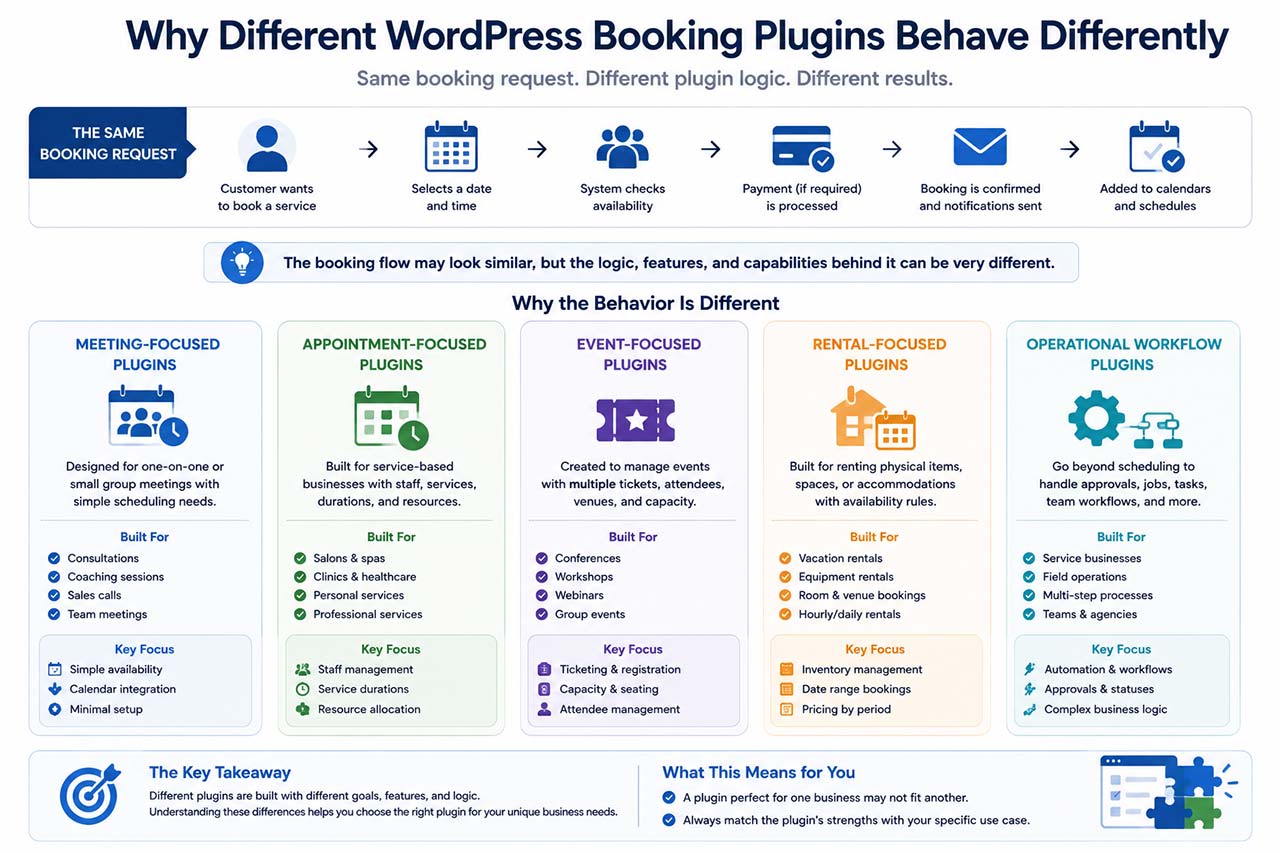
How Different WordPress Booking Plugins Handle Real-World Booking Scenarios
After seeing how a booking moves through a scheduling system, an important question remains:
Why do different WordPress booking plugins behave differently when faced with the same booking request?
At first glance, most booking plugins appear to solve the same problem. They display a form, allow customers to choose a date and time, and create an appointment.
However, the internal logic behind these systems can vary significantly.
The reason is simple:
- Not every booking plugin was built for the same type of business.
- Some focus on meetings.
- Some focus on appointments.
- Some focus on events.
- Others focus on rentals or operational workflows.
Understanding these differences helps explain why a plugin that works perfectly for one business may be completely unsuitable for another. This is one of the main reasons why WordPress booking plugins are available in many different forms, from simple meeting schedulers to advanced booking platforms.
The easiest way to understand the differences between WordPress booking plugins is to place them in real business situations and observe how each type of system responds.
Booking Complexity Changes Everything
A solo consultant, a fitness studio, and a multi-location clinic may all accept online bookings.
However, the complexity behind those bookings can vary dramatically.
As complexity increases, businesses often move from simple scheduling tools toward more advanced WordPress booking plugins capable of managing staff, locations, payments, packages, and operational workflows.
Different booking systems are designed for different levels of complexity. If you’re comparing solutions, see our guide to the best WordPress booking plugins to understand which tools fit different business models and growth stages.
This is one of the main reasons why different WordPress booking plugins exist in the first place.
The following examples show how different categories of WordPress booking plugins respond when faced with real-world business requirements.
Scenario 1: A Business Coach Offering Online Consultations
Imagine a business coach who offers:
- One service
- One calendar
- Online meetings only
The booking process is relatively straightforward.
The customer chooses a time and receives confirmation.
How Meeting Scheduling Plugins Approach This
Tools such as:
- Simply Schedule Appointments
- FluentBooking
are designed for this type of workflow.
Their primary objective is scheduling meetings.
They typically focus on:
- Availability management
- Calendar synchronization
- Booking confirmations
- Meeting links
Because there are few operational variables, these systems can remain lightweight and easy to configure.
How Appointment Booking Plugins Approach This
Appointment-oriented plugins such as:
- Amelia
- Bookly
- BookingPress
- LatePoint
can also handle this scenario.
However, many of their advanced features may remain unused.
The business coach may not need:
- Staff assignment
- Multiple locations
- Resource management
The booking process remains relatively simple regardless of which system is used.
Scenario 2: A Hair Salon With Multiple Stylists
Now consider a salon offering:
- Haircuts
- Coloring
- Treatments
- Styling services
The salon employs several stylists with different skills and schedules.
The booking system must now answer additional questions:
- Which stylist can perform the service?
- Which stylist is available?
- How long will the service take?
- Is preparation time required?
A WordPress appointment booking plugin is typically designed for this type of service-based scheduling environment.
Why Appointment Plugins Excel Here
This type of business is one of the reasons appointment booking plugins became popular.
Solutions such as:
- Amelia
- Bookly
- BookingPress
- LatePoint
are designed around relationships between:
- Services
- Employees
- Schedules
The booking engine understands that different staff members may offer different services.
Why Meeting Schedulers Can Become Limiting
Meeting schedulers are usually optimized for one-to-one appointments.
As staff management becomes more complex, additional configuration or workarounds may be required.
The challenge is not the booking itself.
The challenge is managing multiple employees and service-specific availability.
Scenario 3: A Physiotherapy Clinic
Healthcare businesses often introduce another level of complexity.
A clinic may have:
- Multiple practitioners
- Multiple treatment types
- Treatment rooms
- Follow-up appointments
A booking system must coordinate all of these variables.
Example
A patient wants:
Sports Rehabilitation
The booking plugin may need to determine:
- Which practitioners provide that treatment
- Which rooms are available
- Whether sufficient time exists between appointments
- Whether follow-up scheduling is required
At this stage, scheduling begins to resemble operational management rather than simple appointment booking.
Many clinics eventually prioritize scheduling logic over interface design because operational efficiency becomes more important than visual appearance.
Scenario 4: A Fitness Studio Selling Packages
Not every business sells appointments individually.
Many studios sell:
- 5-session packages
- 10-session packages
- Monthly memberships
This introduces a new challenge.
The booking system must track usage.
Example
A customer purchases:
10 Personal Training Sessions
The booking system should automatically know:
- Sessions purchased
- Sessions used
- Sessions remaining
Some booking systems treat appointments and packages as separate concepts.
Others manage them as part of a unified workflow.
The more package-based a business becomes, the more important this distinction becomes.
Scenario 5: A Multi-Location Business
Growth often creates challenges that smaller businesses never encounter.
Imagine a company with:
- Five locations
- Twenty employees
- Different services at each location
Now the booking system must manage:
- Branch schedules
- Employee assignments
- Location-specific services
- Regional availability
Businesses that reach this level of complexity often start exploring an Amelia alternative with more advanced operational capabilities.
Not every WordPress booking plugin is designed to manage multi-location scheduling at scale.
Why Complexity Increases Rapidly
A customer selecting a location should only see:
- Available services
- Available staff
- Available appointment times
for that branch.
The scheduling engine must constantly evaluate multiple conditions simultaneously.
This is one reason why businesses often outgrow simple booking solutions as they expand.
Scenario 6: Event Registration
Events create a very different type of booking workflow.
Instead of scheduling individual appointments, businesses need to manage:
- Attendees
- Event dates
- Venues
- Capacity
Example
A workshop allows:
50 participants
The booking system must:
- Count registrations
- Track remaining capacity
- Prevent overbooking
This differs significantly from service-based appointment scheduling.
Plugins designed for events, such as The Events Calendar, focus on attendee management rather than staff availability.
The scheduling logic is fundamentally different.
Scenario 7: Rental and Accommodation Reservations
Hotels and rental businesses introduce another booking model.
Instead of scheduling hours, they often schedule:
- Days
- Nights
- Extended periods
Example
A customer books:
July 10 – July 15
The system must calculate:
- Check-in dates
- Check-out dates
- Availability between reservations
- Seasonal pricing
This explains why hotel booking systems such as MotoPress Hotel Booking or Tourfic are built differently from appointment scheduling software.
The reservation logic itself is different.
This is why rental-focused WordPress reservation systems use a completely different scheduling model than appointment booking plugins.
Why Form Builders and Booking Plugins Solve Different Problems
Earlier, we discussed form builders such as:
- Gravity Forms
- Fluent Forms
- WPForms
- Formidable Forms
- JetFormBuilder
Many businesses initially attempt to solve scheduling using forms alone.
For some businesses, this works perfectly well.
Example: Reservation Request
A restaurant may simply collect:
- Name
- Date
- Number of guests
Staff members then review requests manually.
No scheduling engine is required.
Example: Real-Time Booking
Now imagine a business that accepts:
- Hundreds of reservations
- Multiple staff members
- Payments
- Calendar synchronization
Manual review quickly becomes impractical.
The booking system must make decisions automatically.
This is the key distinction:
- A form builder collects information.
- A booking plugin evaluates availability and creates reservations.
Where AI Fits Into Modern Booking Plugins
Artificial intelligence is becoming increasingly common in software, and booking systems are no exception.
However, there is often confusion about what AI actually does inside a booking platform.
Some modern WordPress booking plugins are beginning to integrate AI-assisted features, but the booking engine remains responsible for availability calculations, staff scheduling, payment logic, and reservation management.
What AI Can Help With
AI can assist with tasks such as:
- Customer questions
- Service recommendations
- Booking assistance
- Appointment suggestions
Example: Real-Time Booking
For example, a customer might ask:
“I need a massage next week after work.”
An AI assistant could help identify suitable appointment times, recommend available services, or guide the customer through the booking process.
What AI Cannot Replace
AI still depends on the underlying booking system.
It cannot ignore:
- Staff schedules
- Availability rules
- Capacity limits
- Payment requirements
The booking engine remains responsible for making scheduling decisions.
AI may improve the experience, but it does not replace the operational logic behind bookings.
When a Booking Plugin Becomes a Business Platform
As businesses grow, booking often becomes connected to other operational processes.
Examples include:
- Payments
- Deposits
- Invoices
- Packages
- Memberships
- Customer portals
- Staff portals
At this stage, booking is no longer an isolated task. It becomes part of how the business operates every day.
Some systems focus primarily on scheduling. Others expand into broader operational management. This evolution explains why two booking plugins may appear similar on the surface while serving very different business needs.
This transition from scheduling software to operational platform is one of the key differences between modern WordPress booking plugins and traditional appointment schedulers.
When a Simple Booking Solution Is Enough
Not every business requires an advanced booking platform.
A lightweight scheduling solution may be sufficient when:
- You work alone
- You offer only one service
- You do not sell packages
- You do not require invoices
- You do not manage staff
- You do not need advanced availability rules
In these situations, simplicity can often be an advantage.
Not Every WordPress Booking Plugin Solves the Same Problem
The examples above demonstrate why businesses often reach different conclusions when evaluating WordPress booking plugins.
A consultant, a salon, a clinic, a fitness studio, and a hotel may all require online bookings, yet each relies on a different scheduling model.
The term “WordPress booking plugin” covers a wide range of solutions.
Some are designed for scheduling meetings.
Some focus on appointments.
Others specialize in events, rentals, or more advanced operational workflows.
While the booking form is often the most visible part of the system, the real differences exist behind the scenes.
Availability calculations, staff management, payments, customer records, notifications, and scheduling rules all influence how a booking system behaves.
Understanding these differences helps businesses choose booking software based on operational requirements rather than feature lists alone.
If you’re evaluating solutions, our comparison of the best WordPress booking plugins explains which systems are best suited for consultants, service businesses, multi-location teams, and advanced operational workflows.
As businesses grow, their requirements often evolve as well. A solution that works perfectly for a solo consultant may become limiting for a clinic, a fitness studio, or a multi-location service business.
The most effective booking system is rarely the one with the longest feature list. Instead, it is the one whose architecture aligns with the way the business actually operates.
By understanding how WordPress booking plugins work, businesses can evaluate solutions based on functionality, workflow, and long-term scalability rather than appearances alone.
Frequently Asked Questions About WordPress Booking Plugins
What is a WordPress booking plugin?
A WordPress booking plugin is a software extension that allows customers to schedule appointments, reserve services, register for events, or book resources directly from a WordPress website.
Depending on the plugin, it may also handle payments, staff schedules, customer records, notifications, and calendar synchronization.
What is the difference between a booking request and a confirmed booking?
A booking request simply collects information and requires manual review before approval.
A confirmed booking is automatically validated by the system and immediately reserves the selected time slot, resource, or service.
This distinction is important because many businesses initially use forms to collect booking requests before moving to a dedicated booking system.
Do I need a booking plugin or a form builder?
It depends on how your business operates.
A form builder may be enough when:
- Requests are reviewed manually
- Availability rarely changes
- Instant confirmation is not required
A booking plugin is usually a better solution when you need:
- Real-time availability
- Staff scheduling
- Calendar synchronization
- Payments
- Automated confirmations
Can WordPress booking plugins accept online payments?
Many WordPress booking plugins support online payments through payment gateways.
Depending on the system, businesses may collect:
Full payments
Deposits
Partial payments
Remaining balances
Some booking systems also generate invoices and track payment status automatically.
Which businesses use WordPress booking plugins?
WordPress booking plugins are used across many industries, including:
- Consultants
- Coaches
- Salons
- Clinics
- Fitness studios
- Driving schools
- Event organizers
- Rental businesses
The type of booking plugin required often depends on the complexity of the scheduling process.
Do all booking plugins support multiple staff members?
No.
Some scheduling plugins are designed primarily for individuals.
Others are built specifically for businesses with multiple employees, locations, or departments.
When evaluating a booking solution, staff management is often one of the most important features to consider.
Can a booking plugin synchronize with Google Calendar?
Many WordPress booking plugins offer Google Calendar synchronization.
Some also support:
- Microsoft Outlook
- Apple Calendar
- iCal-compatible systems
Calendar synchronization helps prevent scheduling conflicts and keeps availability accurate.
Can booking plugins manage recurring appointments?
Some booking systems support recurring appointments.
Examples include:
- Weekly fitness sessions
- Monthly consultations
- Ongoing treatment plans
Support for recurring bookings varies between plugins and business models.
What is the difference between a booking plugin and a booking platform?
A booking plugin typically focuses on scheduling appointments or reservations.
A booking platform may additionally include:
- Payments
- Invoices
- Packages
- Memberships
- Customer portals
- Staff portals
- Operational workflows
As businesses grow, many move from simple scheduling tools toward broader booking platforms.
Can AI replace a booking plugin?
No.
Artificial intelligence can assist with scheduling and customer communication, but it still depends on the booking system’s underlying availability rules, staff schedules, and payment logic.
AI can improve the booking experience, but it does not replace the booking engine itself.