
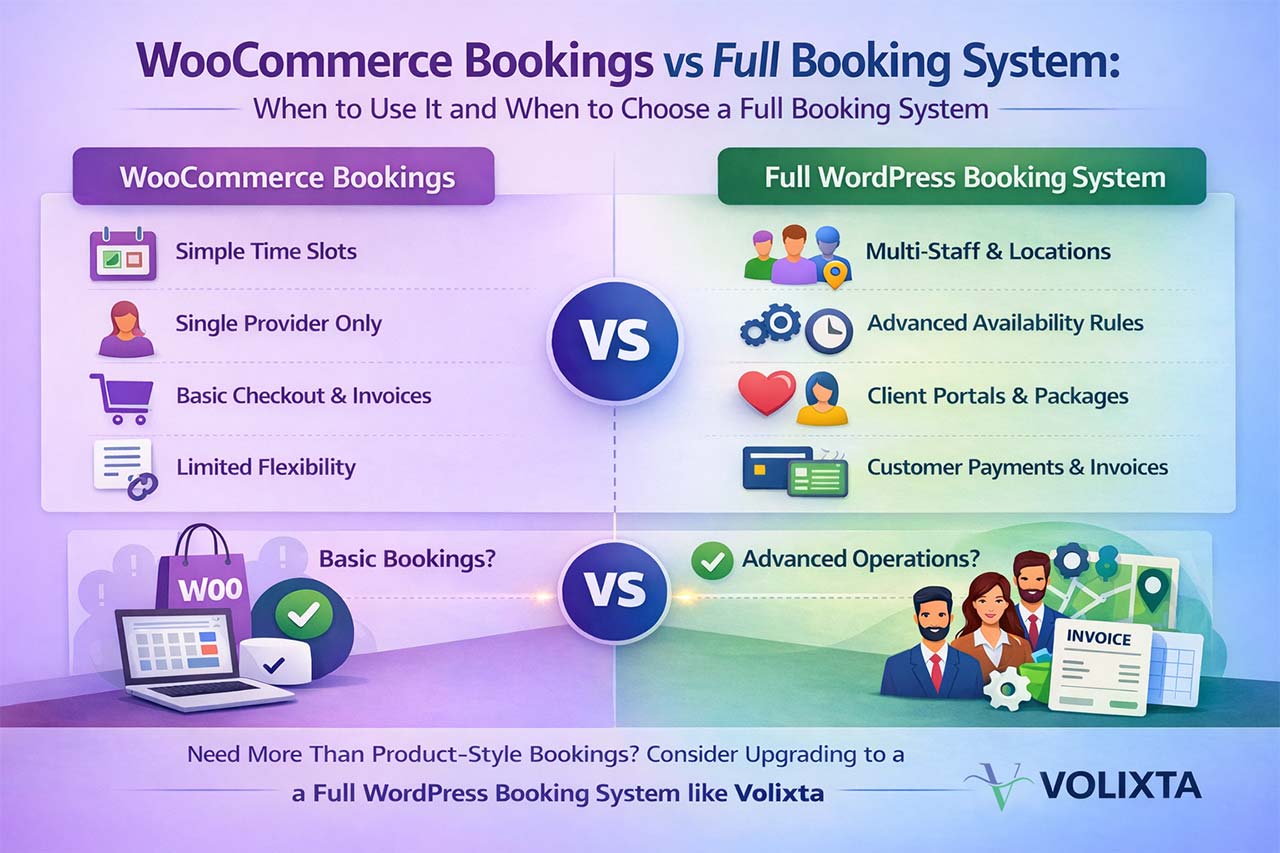
This is the moment when many owners start looking for a WooCommerce Bookings alternative that can handle real-world booking workflows without forcing everything into a single product model.
If you are exploring different options, you can also check our guide to the best WooCommerce Bookings alternatives.
This article compares WooCommerce Bookings with a full WordPress booking system plugin to help you choose the right solution.
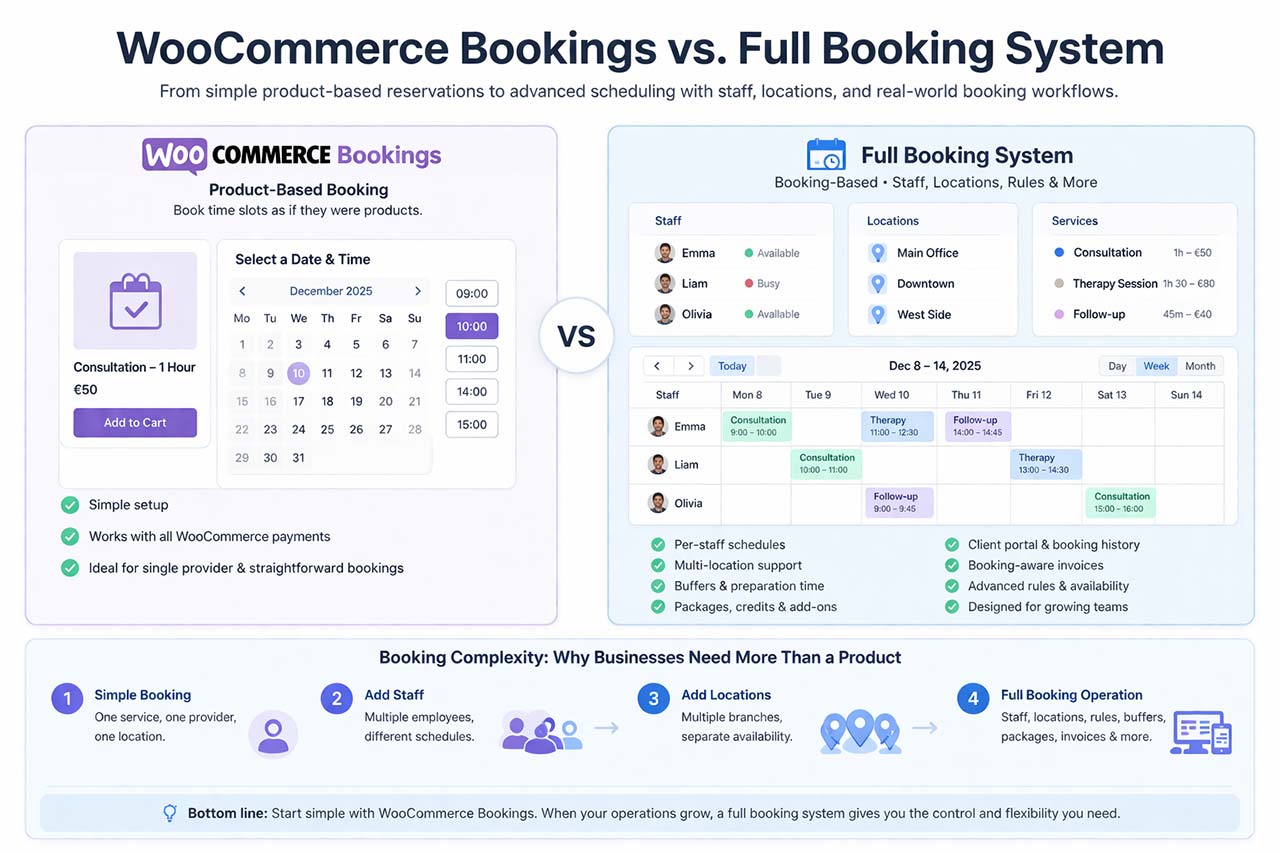
Is a Product-Based Booking Enough?
This guide explains when WooCommerce Bookings is the right fit, when its model reaches its limits, and how an advanced WordPress booking system such as Volixta can act as an alternative or a complement for more complex needs.
WooCommerce Bookings Limitations
WooCommerce Bookings works well for simple use cases, but several limitations appear as soon as your booking logic becomes more complex.
Common issues include:
- difficulty managing multiple staff members with different schedules
- limited control over multi-location availability
- complex setup for buffers and preparation times
- lack of native support for packages, credits, or advanced billing
- bookings treated as products instead of operational events
In real projects, these limitations often don’t appear immediately — but they become obvious as soon as bookings involve multiple people, locations, or custom rules.
Here is a quick comparison to better understand the differences:
| Feature | WooCommerce Bookings | Full Booking System |
|---|---|---|
| Booking model | Product-based (bookings as WooCommerce products) | Booking-based (appointments as core objects) |
| Staff management | Limited or indirect | Advanced (per staff schedules, roles, dashboards) |
| Multi-location | Complex to manage | Native support with separate availability |
| Availability & rules |
|
|
| Buffers & preparation time | Basic configuration | Fully configurable (before & after appointments) |
| Packages & credits | Limited or requires extensions | Built-in (packages, credits, gift codes) |
| Invoices | Generic WooCommerce order lines | Booking-aware invoices (services, add-ons, taxes) |
| Client experience | Checkout-focused |
|
| Scalability | Good for simple setups | Designed for growing teams and complex workflows |
| Best use case | Simple bookings with minimal setup | Advanced booking operations with teams and locations |
| Best for | Simple bookings and small setups | Advanced scheduling, teams, and multi-location businesses |
When WooCommerce Bookings Is the Perfect Fit
Before considering alternatives, it’s important to understand when WooCommerce Bookings actually works very well.
WooCommerce Bookings extends WooCommerce products with dates and time slots.
It is ideal when:
- each reservation is basically a product with a time
- one provider or resource handles the service
- availability is mostly global and simple
- pricing is directly tied to duration or day
- standard WooCommerce checkout and invoices are sufficient
Because everything stays inside WooCommerce:
- any WooCommerce payment gateway works immediately
- taxes and coupons use your existing store rules
- orders and emails follow the normal WooCommerce flow
For solo providers or very small teams, this simplicity is a strong advantage and no alternative is really needed.
Where the Product Model Starts to Break Down
As operations grow, bookings stop behaving like simple products.
What used to be “choose a time and pay” quickly turns into something more complex.
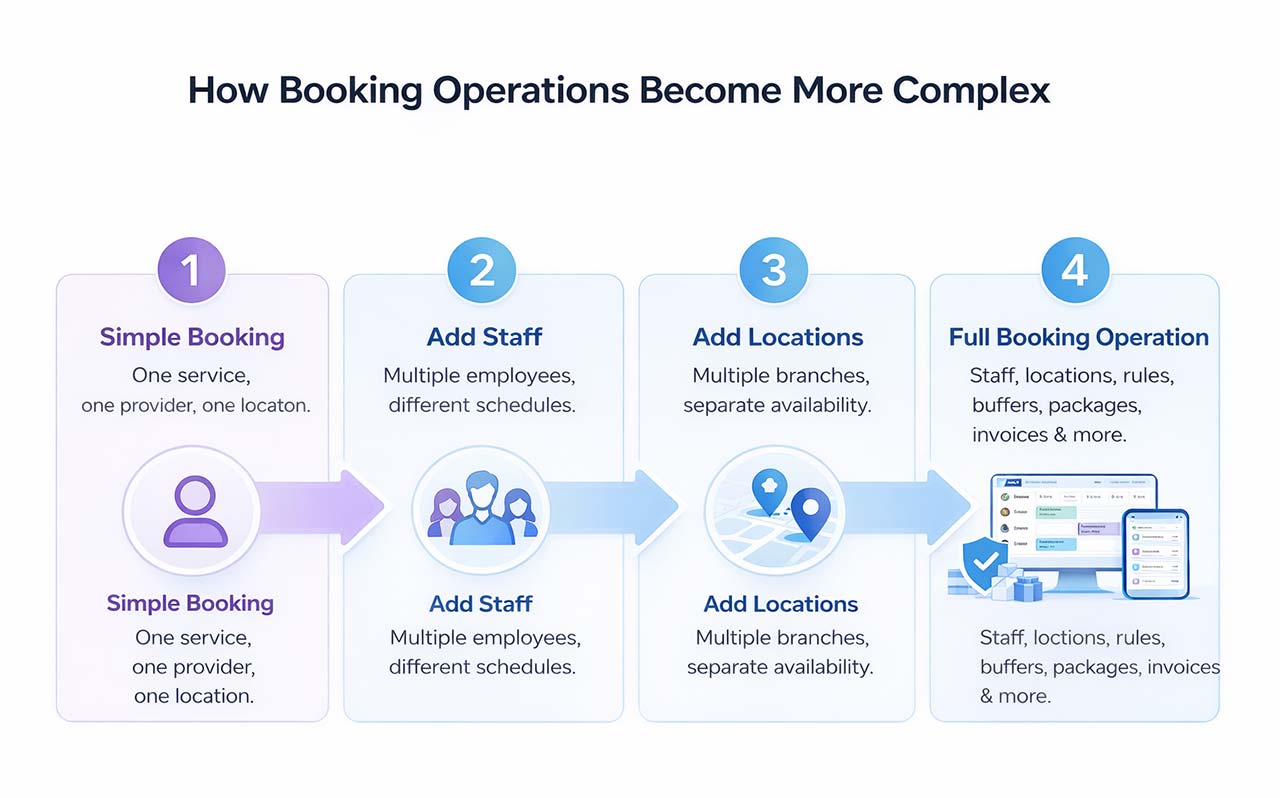
For example:
- A salon with multiple employees may need different schedules per staff member.
- A clinic with several locations may require separate availability rules per branch.
- A coaching business may want to sell packages or prepaid sessions instead of single bookings.
In practice, this often means handling:
- different working hours for each staff member
- multiple locations with independent schedules
- services whose duration depends on the provider
- preparation and buffer times between appointments
- specific opening days, holidays, and exceptions
At this stage, trying to manage everything through product settings becomes repetitive, difficult to maintain, and prone to errors.
Billing requirements also evolve:
- deposits instead of full upfront payments
- prepaid packages or session bundles
- credits and gift codes
- invoices that clearly reflect services, durations, and add-ons
For example, a simple order line like “Consultation – €50” often does not reflect what actually happened: which staff member handled it, how long it lasted, or what extras were included.
This is typically the point where many businesses start looking for a WooCommerce Bookings alternative.
What a Full WordPress Booking System Changes
A full booking system built as a WordPress plugin treats bookings as their own objects, not as variations of products.
Instead of “which product was bought?”, the system works with:
- which service
- with which staff member
- at which location
- under which availability rules
This unlocks advanced scheduling features such as:
- flexible global and per-staff working hours
- configurable preparation and buffer times
- advance notice requirements
- intelligent staff assignment
- multi-branch control of availability
These rules are native to the booking logic, not workarounds.
Real Team and Staff Management
In product-based booking, staff is often implicit.
In a full booking system like Volixta, staff is a core concept.
You can:
- create and manage all team members
- assign services and locations per person
- give each employee a personal dashboard
- provide a frontend staff portal without WordPress admin access
- define roles and permissions for managers
Managers get a global overview calendar, while each staff member manages only their own schedule.
A Complete Client Experience, Not Just a Checkout
With simple bookings, the journey ends at payment.
A full system extends the relationship through:
- client profiles with history
- a self-service client portal
- prepaid packages clients can track and redeem
- one-click calendar sync after booking
- automated confirmation and reschedule emails
Booking becomes an ongoing service experience, not a one-time purchase.
Payments with WooCommerce, but Booking-Aware Checkout and Invoices
A major difference appears in billing.
WooCommerce Bookings uses the standard WooCommerce checkout and generic order invoices.
A full booking plugin can still use WooCommerce for payments, but adapt everything else to appointments.
Custom checkout designed for bookings
Cart, checkout, and thank-you pages can be redesigned specifically for appointment flows instead of generic product purchases.
Booking-aware invoices instead of generic product lines
Invoices are generated from real booking data:
- services
- add-ons
- packages
- durations
- taxes per service
Deposits, partial payments, and credits
It becomes possible to handle:
- deposits with remaining balances
- partial payments
- prepaid credits and gift codes
All linked directly to the booking, not just to an order total.
Multi-Branch and Multi-Location Control
When a business operates in more than one location, availability cannot be managed as a single global calendar.
A full WordPress booking system lets you structure your operations by branch:
- assign specific services to specific locations
- attach staff members to one or multiple branches
- define independent working hours and exceptions per location
- control which services are available where
This makes it possible to run several offices, salons, or clinics with their own schedules, while still keeping everything inside one unified system.
Managers can view and manage all branches from a global overview, while day-to-day availability is handled locally and accurately for each location.
This level of control is difficult to express with product-based bookings, where availability is usually shared or duplicated rather than truly separated per branch.
App-Like Interface Inside WordPress
At higher booking volumes, usability and accessibility for non-technical users become critical.
An advanced WordPress booking system can run almost entirely in the frontend of your site, without requiring staff to access the WordPress admin dashboard.
This allows you to provide:
- fast, mobile-optimized multi-step booking flows for clients
- app-like navigation between screens
- frontend calendars and dashboards for staff and managers
- frontend invoice and booking views for clients
- placement of these interfaces anywhere on the site using shortcodes
- full translation and localization for multilingual audiences
Employees and supervisors manage their schedules from dedicated frontend pages, while administrators can still configure everything from the backend when needed.
Everything stays inside your own WordPress installation, but the experience feels like a standalone booking application rather than a traditional admin panel.
When to Stay with WooCommerce Bookings
WooCommerce Bookings is the right choice when:
- reservations are simple and product-like
- one main provider or resource is enough
- locations and rules are minimal
- standard WooCommerce invoices are acceptable
In these cases, the product model remains efficient and easy to maintain, and no heavy alternative is required.
When to Move to a Full WordPress Booking System
A dedicated WordPress booking system such as Volixta becomes more suitable when you need:
- per-staff and per-location schedules
- complex availability and buffer logic
- real staff and manager workflows
- client portals and booking history
- packages, credits, and add-ons
- booking-specific invoices with detailed tax handling
- custom checkout flows tailored to appointments
At this stage, treating bookings as products creates more friction than value.
Alternative or Complement Rather Than Replacement
Moving to a WooCommerce Bookings alternative does not have to be all-or-nothing.
WooCommerce can continue to process payments through its gateways, while a full booking system manages:
- scheduling and availability
- team and branch logic
- client experience and CRM
- booking-aware checkout and invoicing
This hybrid approach keeps your payment ecosystem while upgrading how bookings actually work.
Best WooCommerce Bookings Alternatives
Depending on your needs, several types of alternatives exist:
- simple booking plugins for freelancers and small businesses
- appointment-focused plugins with staff scheduling
- advanced booking systems designed for multi-location businesses and complex workflows
The right choice depends on how your business operates, not just on features.
Volixta is one example of a full booking system designed for businesses that require advanced scheduling, team management, and booking-aware billing.
Here is a quick overview of some popular WooCommerce Bookings alternatives and what they are best suited for.
For a more detailed comparison, you can also explore our complete list of WordPress booking plugins.
| Plugin | Best for | Key strengths | Complexity |
|---|---|---|---|
| Amelia | Service businesses with staff and appointments |
|
Medium |
| Bookly | Flexible booking setups with many add-ons |
|
Medium–High |
| FluentBooking | Simple scheduling and meeting bookings |
|
Low |
| Volixta | Advanced booking operations with teams and locations |
|
High |
Each of these tools serves a different type of business. The right choice depends less on features alone and more on how your booking workflow is structured.
Making the Right Choice for Your Business
There is no universal winner.
WooCommerce Bookings is excellent for straightforward, product-style reservations.
A full, self-hosted WordPress booking system like Volixta is designed for real service operations with teams, locations, advanced rules, and detailed billing.
If your needs are moving from “selling a time slot” to “running a complete booking operation”, choosing a WooCommerce Bookings alternative is less about adding features and more about adopting the right model for how your business actually works.
If you’re still unsure which solution fits your needs, you can compare the best WooCommerce Bookings alternatives or explore all available tools in our WordPress booking plugins guide.
Explore a Full Booking System
If you are reaching the limits of WooCommerce Bookings, it may be time to explore a system designed specifically for booking operations.
A full WordPress booking system like Volixta can handle advanced scheduling, team management, and booking-aware billing — while still working alongside WooCommerce for payments.
FAQ
Is WooCommerce Bookings enough for most businesses?
Yes, it works well for simple use cases, but can become limiting for growing teams or complex scheduling needs.
What is the best WooCommerce Bookings alternative?
It depends on your needs. For advanced scheduling, staff management, and booking-aware billing, a full WordPress booking system is usually more suitable.
Can I use WooCommerce with another booking plugin?
Yes, many booking systems integrate with WooCommerce for payments while managing scheduling separately.